---
title: Comment ajouter une programmation sur l'application Shelly ?
description: Ajouter une programmation sur l'application Shelly
---
[Passer au contenu](https://help.goensol.com/comment-ajouter-une-programmation-sur-lapplication-shelly-#main-content)
Français
Afficher le sous-menu pour les traductions

- Home
- Products
- Pricing
- Blog
- Company
Ouvrir la navigation principale
Fermer la navigation principale
- Home
- Products
- Pricing
- Blog
- Company
- Français
Afficher le sous-menu pour les traductions
- Contact
Contact
Comment pouvons-nous vous aider ?
- Il n'y a aucune suggestion car le champ de recherche est vide.
1. [Centre d'aide Ensol](https://help.goensol.com/?hsLang=fr)
2. [Assistance technique](https://help.goensol.com/assistance-technique?hsLang=fr)
3. [Shelly](https://help.goensol.com/assistance-technique?hsLang=fr#shelly)
# Comment ajouter une programmation sur l'application Shelly ?
1. **Planning de marche**
Pour redéfinir un planning de fonctionnement, aller dans l'onglet "Calendrier " (6ème onglet de la barre latérale). Cliquer sur "Ajouter programmation".
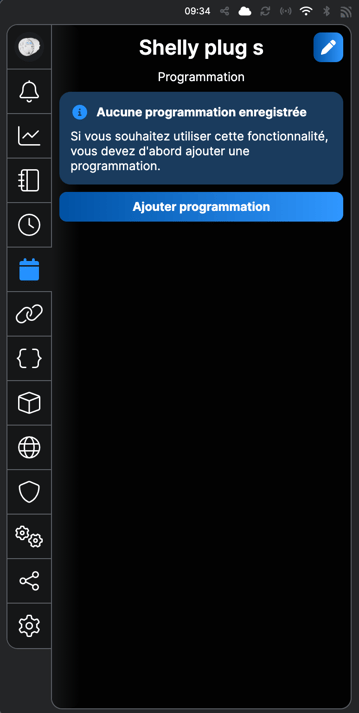
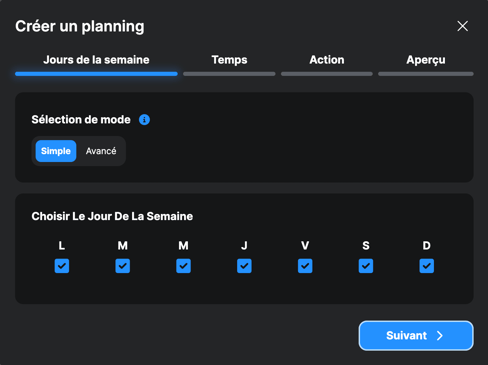
Sélectionnez les jours de la semaine sur lesquels vous voulez appliquez votre programmation et cliquez sur "Suivant".
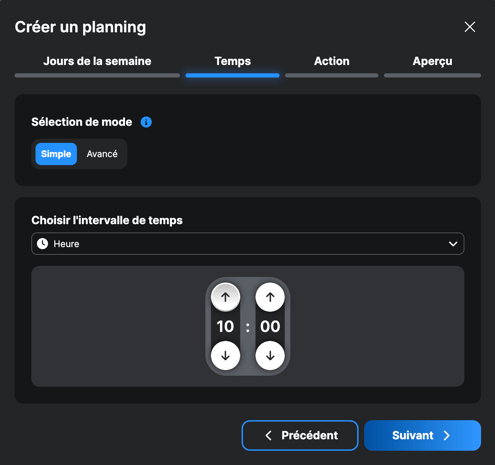
Sélectionnez l'heure de début de votre programmation et cliquez sur "Suivant".
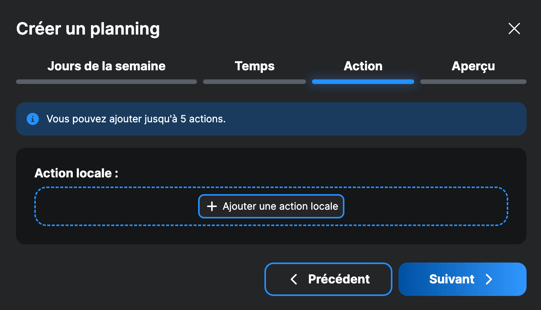
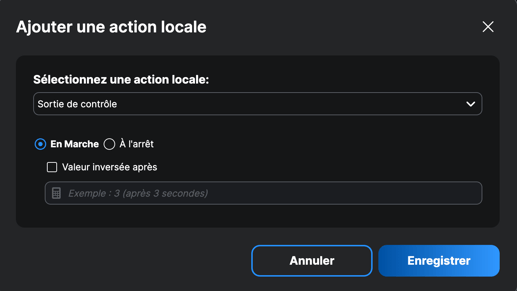
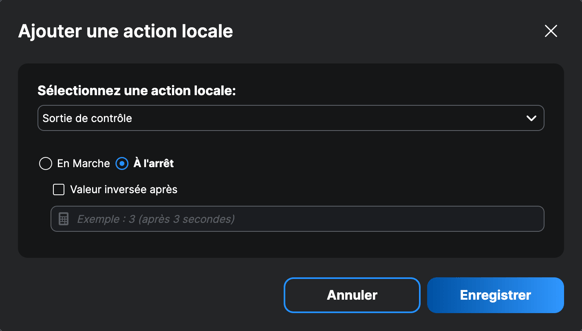
Ajoutez une action locale.
Sélectionnez "En marche" pour le début de votre programmation (heure à laquelle vous souhaitez allumer votre appareil connecté) et cliquez sur "Enregistrer".
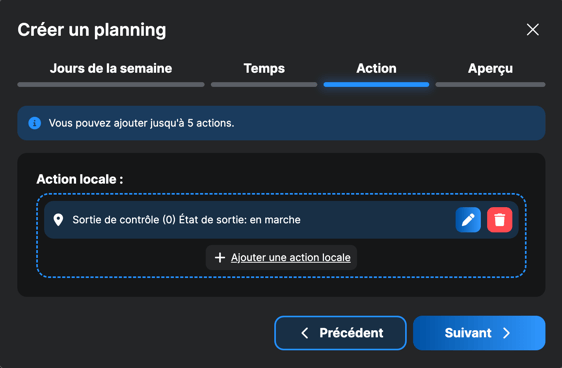
Appuyez sur "Suivant" et vérifiez que votre action locale a été correctement enregistrée, via l'onglet "Aperçu".
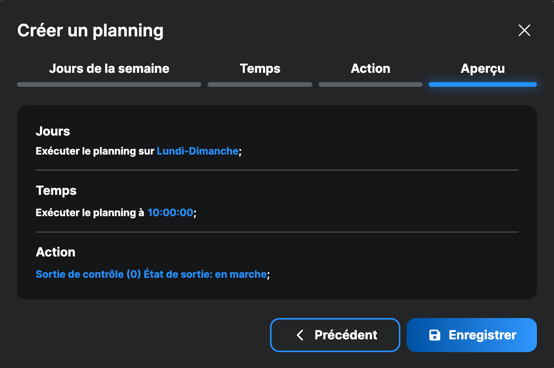
Appuyez sur "Enregistrer" si le planning correspond à la programmation souhaitée, sinon revenir en arrière et modifiez selon vos besoins.
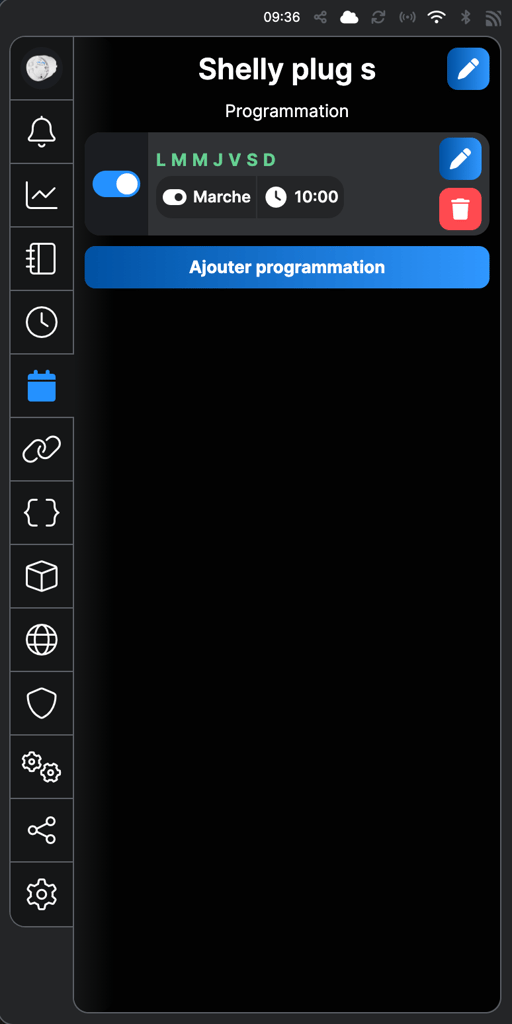
La programmation de mise en marche de votre appareil a bien été enregistrée !
**2. Planning d'arrêt**
Pour ajouter une programmation de mise en arrêt de votre appareil, vous devez reproduire les mêmes étapes que pour le planning de marche (ci-dessus). Appuyez sur "Ajouter programmation", et redéfinissez les jours et les heures, comme pour la programmation de mise en marche.
Cette fois-ci, sélectionnez "A l'arrêt" dans l'onglet "Action locale". Enregistrez votre programmation de mise en arrêt.
Vérifier d'avoir une programmation de mise en marche et de mise en arrêt concordante. Vous pouvez modifier vos programmations en cliquant sur les icônes avec le crayon bleu et les supprimer en cliquant sur la poubelle rouge.
Vous pouvez ajouter plusieurs programmations sur le même appareil: attention à ce que les différentes programmations soient concordantes entre elles !
- [Démarches administratives](https://help.goensol.com/d%C3%A9marches-administratives?hsLang=fr#main-content)
- [Déclaration préalable auprès de la mairie](https://help.goensol.com/d%C3%A9marches-administratives?hsLang=fr#d%C3%A9claration-pr%C3%A9alable-aupr%C3%A8s-de-la-mairie)
- [Le raccordement de l’installation au réseau par Enedis](https://help.goensol.com/d%C3%A9marches-administratives?hsLang=fr#le-raccordement-de-linstallation-au-r%C3%A9seau-par-enedis)
- [Validation de la conformité par le Consuel](https://help.goensol.com/d%C3%A9marches-administratives?hsLang=fr#validation-de-la-conformit%C3%A9-par-le-consuel)
- [Revente du surplus d’électricité auprès d’EDF OA](https://help.goensol.com/d%C3%A9marches-administratives?hsLang=fr#revente-du-surplus-d%C3%A9lectricit%C3%A9-aupr%C3%A8s-dedf-oa)
- [Le déroulé de mon installation](https://help.goensol.com/le-d%C3%A9roul%C3%A9-de-mon-installation?hsLang=fr#main-content)
- [L'installation](https://help.goensol.com/le-d%C3%A9roul%C3%A9-de-mon-installation?hsLang=fr#linstallation)
- [La validation à distance du chantier](https://help.goensol.com/le-d%C3%A9roul%C3%A9-de-mon-installation?hsLang=fr#la-validation-%C3%A0-distance-du-chantier)
- [Après mon installation](https://help.goensol.com/apr%C3%A8s-mon-installation?hsLang=fr#main-content)
- [Assurances garanties et maintenance](https://help.goensol.com/apr%C3%A8s-mon-installation?hsLang=fr#assurances-garanties-et-maintenance)
- [Impôts et taxe foncière](https://help.goensol.com/apr%C3%A8s-mon-installation?hsLang=fr#imp%C3%B4ts-et-taxe-fonci%C3%A8re)
- [Le suivi de ma production](https://help.goensol.com/le-suivi-de-ma-production?hsLang=fr#main-content)
- [Comprendre mon installation](https://help.goensol.com/le-suivi-de-ma-production?hsLang=fr#comprendre-mon-installation)
- [Comprendre mes données](https://help.goensol.com/le-suivi-de-ma-production?hsLang=fr#comprendre-mes-donn%C3%A9es)
- [Mon bilan énergétique](https://help.goensol.com/le-suivi-de-ma-production?hsLang=fr#mon-bilan-%C3%A9nerg%C3%A9tique)
- [Application, pilotage et services Ensol](https://help.goensol.com/application-pilotage-et-services-ensol?hsLang=fr#main-content)
- [Mes premiers pas sur l'app Ensol](https://help.goensol.com/application-pilotage-et-services-ensol?hsLang=fr#mes-premiers-pas-sur-lapp-ensol)
- [Utiliser l'app Ensol](https://help.goensol.com/application-pilotage-et-services-ensol?hsLang=fr#utiliser-lapp-ensol)
- [Le pilotage Ensol](https://help.goensol.com/application-pilotage-et-services-ensol?hsLang=fr#le-pilotage-ensol)
- [Le pilotage de mon chauffe-eau](https://help.goensol.com/application-pilotage-et-services-ensol?hsLang=fr#le-pilotage-de-mon-chauffe-eau)
- [Le pilotage de ma batterie](https://help.goensol.com/application-pilotage-et-services-ensol?hsLang=fr#le-pilotage-de-ma-batterie)
- [Mon espace client](https://help.goensol.com/application-pilotage-et-services-ensol?hsLang=fr#mon-espace-client)
- [Le pilotage de ma borne de recharge](https://help.goensol.com/application-pilotage-et-services-ensol?hsLang=fr#le-pilotage-de-ma-borne-de-recharge)
- [Assistance technique](https://help.goensol.com/assistance-technique?hsLang=fr#main-content)
- [Shelly](https://help.goensol.com/assistance-technique?hsLang=fr#shelly)
- [Matériel Huawei](https://help.goensol.com/assistance-technique?hsLang=fr#mat%C3%A9riel-huawei)
- [Matériel Enphase](https://help.goensol.com/assistance-technique?hsLang=fr#mat%C3%A9riel-enphase)
- [Borne de recharge Wallbox](https://help.goensol.com/assistance-technique?hsLang=fr#borne-de-recharge-wallbox)
- [Problèmes techniques et dommages matériels](https://help.goensol.com/assistance-technique?hsLang=fr#probl%C3%A8mes-techniques-et-dommages-mat%C3%A9riels)
- Home
- Products
- Pricing
- Blog
- Company
[](http://goensol.com)
490 Av. des Templiers, 13400 Aubagne | Tél 04 12 28 02 76 | [www.goensol.com](http://www.goensol.com/)
Ensol Group | SAS au capital de 200 286 € | RCS 978 246 601 | SIRET 97824660100014 | Code APE 3511Z
[mailto:email@email.com](mailto:email@email.com)
Copyright © 2025, Ensol Group SAS